Inside Every AI Agent: Memory, Tools, and the System Prompt That Runs It All
You open Cursor, type "add a dark mode toggle to the settings page," and watch it read your files, write code across three components, run the dev server, and verify the result. Or you fire up Claude Code in your terminal and ask it to refactor your auth middleware - it reads the codebase, makes a plan, edits files, and runs your tests.
These aren't just chatbots with a text box. They're agents - software systems built around an LLM with a specific architecture that lets them perceive, reason, and act. And if you use them every day (you probably do), understanding what's inside them will make you a significantly better developer.
In my previous post, How LLMs Actually Work, I explained the engine - transformers, tokenization, attention, inference. This post explains the car built around that engine.
The Agent Loop: Observe, Think, Act, Repeat
Every AI agent - whether it's Cursor, Claude Code, Replit Agent, or a custom agent you build yourself - runs the same fundamental loop:
- Observe - Gather context: the user's message, file contents, terminal output, previous conversation turns.
- Think - Send everything to the LLM. The model decides what to do next: answer directly, call a tool, ask for clarification, or break the task into steps.
- Act - Execute the decision: edit a file, run a command, search the codebase, make an API call.
- Observe again - Read the result of that action (did the command succeed? what did the file look like after the edit?) and feed it back into the loop.
This loop repeats until the task is complete or the agent decides it needs your input. The LLM is just the "think" step. Everything else - the observation, the action execution, the context management - is engineering built around it.
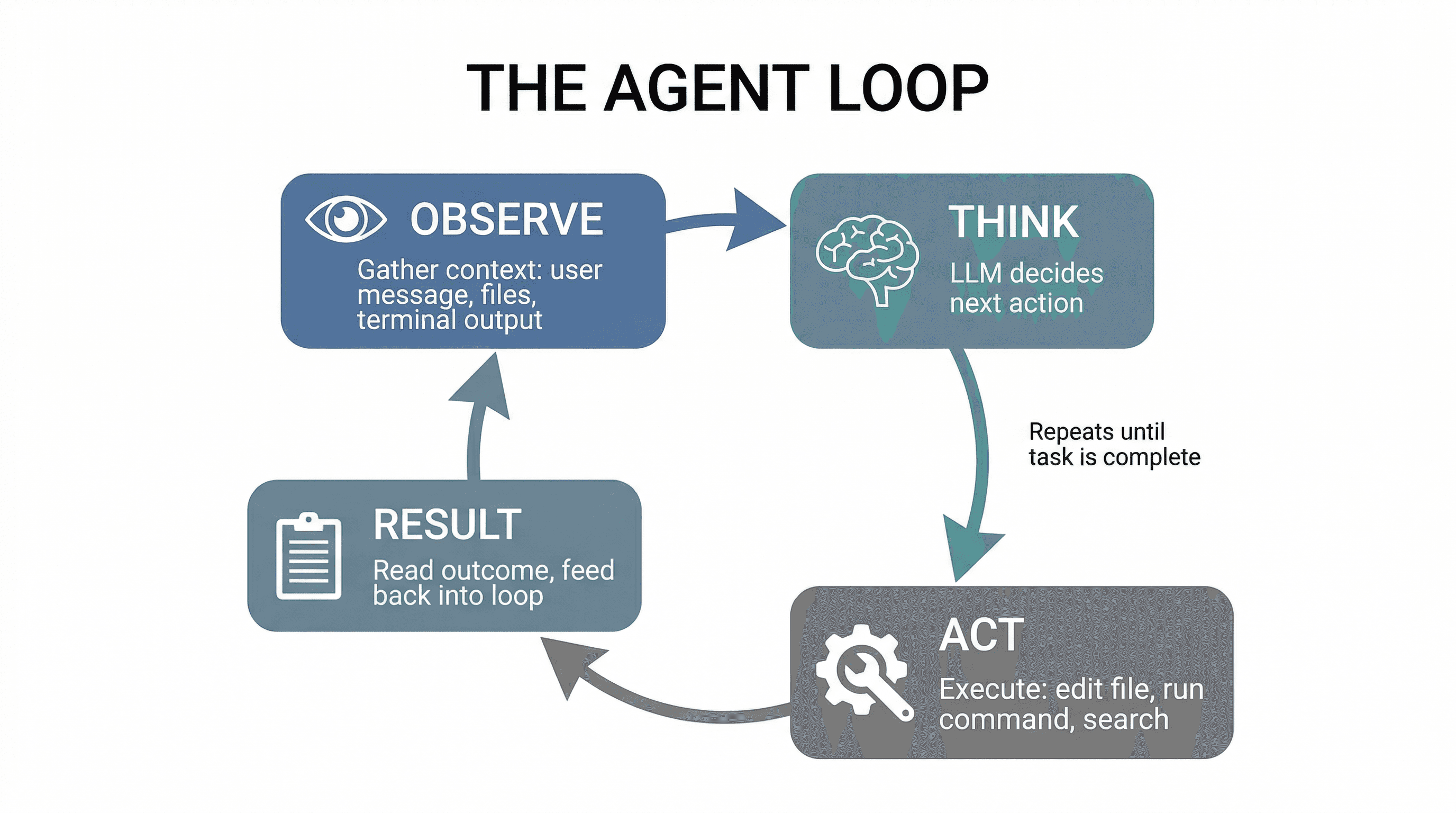
When you ask Cursor to "fix this TypeScript error," it's running this loop: read the error (observe), decide which file to edit (think), make the edit (act), check if the error is gone (observe again). If it's not fixed, loop again.
The System Prompt: The Agent's DNA
Before you ever type a word, the agent has already received hundreds (sometimes thousands) of lines of instructions. This is the system prompt - and it's the single most important piece of the architecture.
The system prompt typically defines:
- Identity and role - "You are an expert software engineer" or "You are a coding assistant that generates React components."
- Behavioral rules - "Always use TypeScript. Prefer functional components. Never use var."
- Available tools - A list of every tool the agent can call (file read, file write, terminal, search), with schemas for each one.
- Output format - Whether to respond in plain text, JSON, code blocks, or structured tool calls.
- Safety constraints - "Don't delete files without confirmation. Don't push to main without asking."
This is why Cursor generates code instead of writing poetry. It's not because the underlying model (Claude, GPT-4) can only do code - it's because the system prompt constrains and focuses the model for that specific task.
Think of the system prompt as the agent's DNA. Two agents using the exact same LLM can behave completely differently based solely on their system prompts. A code review agent and a code generation agent might both use Claude, but their system prompts create entirely different behaviors.
Context Window & Memory: Short-Term vs. Long-Term
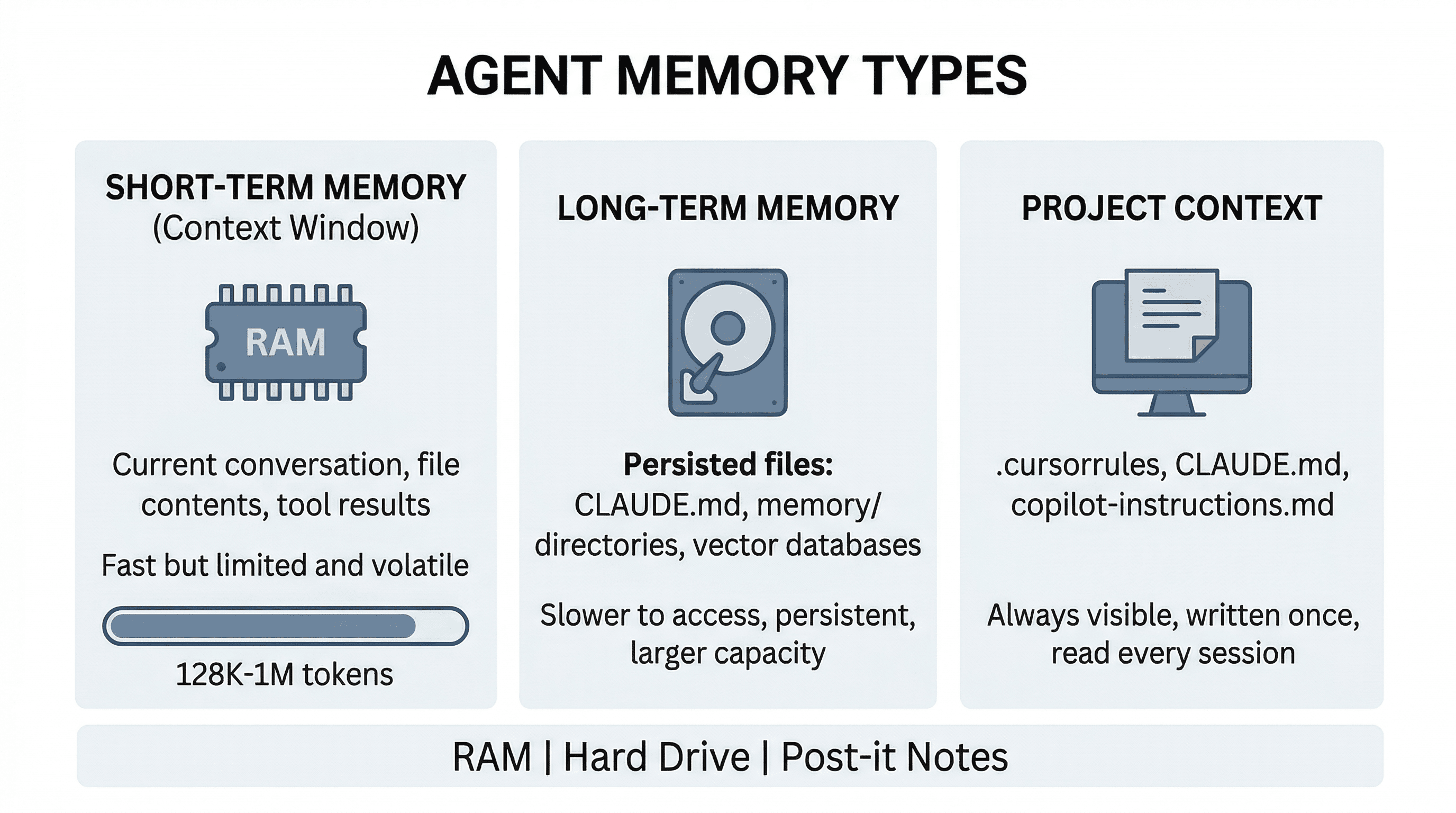
The context window is the agent's working memory - everything the LLM can "see" at once. It includes the system prompt, your conversation history, file contents, tool results, and any retrieved context. It's measured in tokens.
Here's the thing: the context window is finite. Claude's is up to 1M tokens. GPT-4o supports 128K. When a conversation grows beyond the window, the oldest messages get dropped or compressed. This is why agents sometimes "forget" what you talked about earlier - the information literally fell out of the window.
To work around this, agents use different memory strategies:
- Short-term memory - The current conversation context. Everything in the context window right now. Fast, but ephemeral.
- Long-term memory - Persisted storage that survives across sessions. Claude Code writes memory files to disk (
CLAUDE.md,memory/directories). Other tools use vector databases or key-value stores. - Project context - Files like
CLAUDE.md,.cursorrules, or.github/copilot-instructions.mdthat you write once and the agent reads every session. This is how you teach the agent about your project's conventions without repeating yourself.
The best analogy: the context window is RAM (fast, limited, volatile), long-term memory is your hard drive (slower to access, persistent, larger capacity), and project context files are post-it notes stuck to your monitor (always visible).
Tools & Function Calling: Hands, Not Just a Brain
A raw LLM can only generate text. It can't read your files, run your tests, or check if the code it wrote actually compiles. Tools are what give an agent hands.
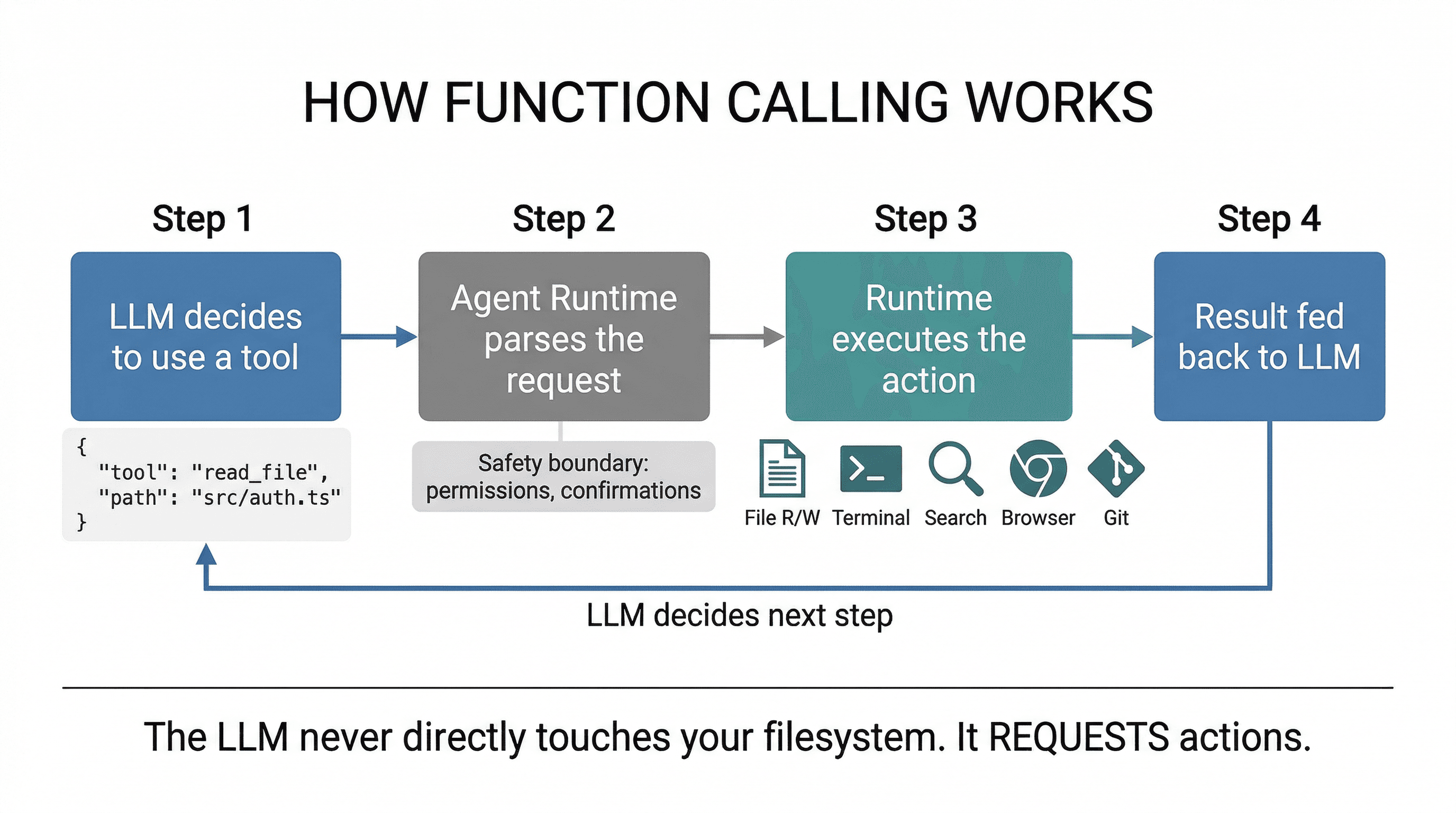
Here's how function calling works under the hood:
- The system prompt defines available tools with their names, descriptions, and parameter schemas (in JSON Schema format).
- When the LLM decides it needs to use a tool, instead of generating text, it outputs a structured tool call:
{"tool": "read_file", "params": {"path": "src/auth.ts"}} - The agent runtime (not the LLM) parses this, executes the actual operation, and feeds the result back into the conversation.
- The LLM sees the result and decides the next step - maybe another tool call, maybe a response to the user.
Common agent tools include:
- File operations - Read, write, edit, glob, grep. The bread and butter.
- Terminal/shell - Run commands, install packages, execute tests, start dev servers.
- Search - Web search, codebase search, semantic search across documentation.
- Browser - Navigate pages, take screenshots, click elements. Used for testing and web interaction.
- Git - Stage, commit, diff, push. Agents that manage version control directly.
The critical insight: the LLM never directly touches your filesystem or runs commands. It requests actions, and a separate runtime layer executes them. This is the safety boundary - it's where permission checks, confirmations, and sandboxing live.
RAG & Retrieval: How Agents Know Your Codebase
Your codebase might be 100,000 lines across 500 files. The context window might hold 200K tokens. You can't send everything. So how does the agent know which files matter for your current question?
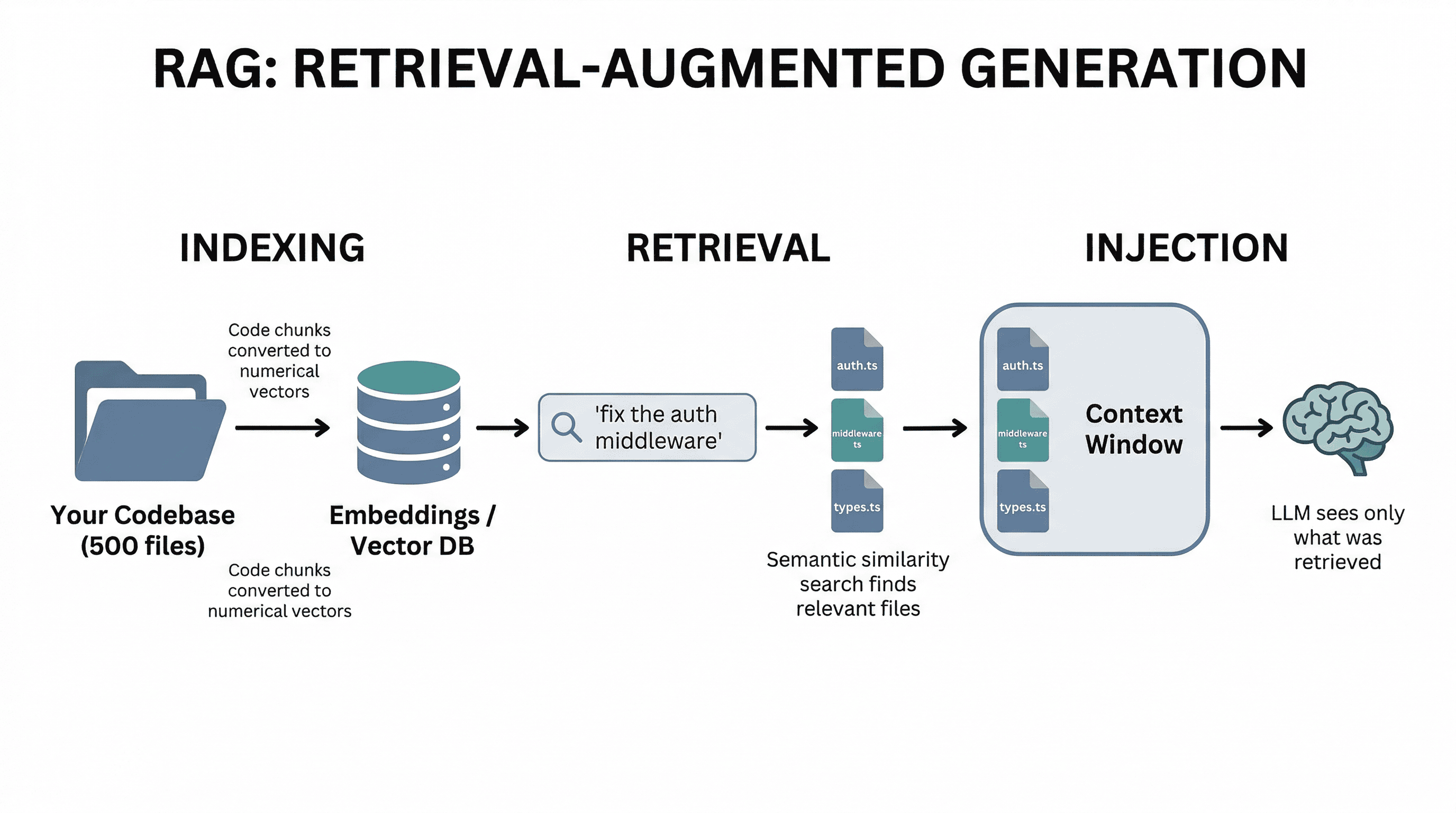
This is where RAG (Retrieval-Augmented Generation) comes in. The agent retrieves relevant context before sending anything to the LLM:
- Indexing - When you open a project, the tool processes your files and creates embeddings - numerical representations that capture the meaning of each chunk of code.
- Retrieval - When you ask a question, the agent converts your query into an embedding and finds the most semantically similar code chunks using vector similarity search.
- Injection - The retrieved files/chunks are injected into the context window alongside your question, giving the LLM the information it needs to answer accurately.
Cursor does this transparently when you press Cmd+Enter in Composer - it searches your codebase, grabs the relevant files, and includes them in the prompt. Claude Code uses a combination of file reading tools and intelligent file selection. The quality of this retrieval step directly determines how good the agent's output is.
This is also why agents sometimes suggest changes that conflict with other parts of your codebase - if the retrieval missed a relevant file, the LLM doesn't know it exists.
Planning & Multi-Step Reasoning
A simple question like "what does this function do?" needs one LLM call. But "add user authentication with Google OAuth, email verification, and protected routes" requires dozens of steps across multiple files. This is where planning comes in.
Sophisticated agents handle complex tasks by:
- Decomposition - Breaking the request into sub-tasks: "First set up the OAuth provider, then create the auth middleware, then add protected route wrappers, then update the login page."
- Sequential execution - Working through each sub-task one at a time, using the result of each step to inform the next.
- Verification - After making changes, checking that they work: running the build, executing tests, verifying the dev server still starts.
- Error recovery - When a step fails, diagnosing the issue and adjusting the approach rather than blindly retrying.
Some agents make this explicit. Claude Code has a "plan mode" where it explores the codebase, designs an approach, and presents it to you before writing any code. Others, like Cursor's Composer, plan implicitly - you see the agent working through files one by one, but the planning happens inside the LLM's reasoning.
The key difference between a beginner agent and a production-grade one is often not the LLM - it's the planning and verification layer around it.
Temperature & Sampling: Why Agents Feel Deterministic
You might have noticed: when you ask an agent to write code, you get consistent, predictable output. But when you ask it to brainstorm feature names, you get creative variety. This is controlled by temperature.
Temperature controls how randomly the model samples from its probability distribution:
- Temperature 0 - Always pick the most likely token. Deterministic, consistent. Ideal for code generation where you want the same input to produce the same output.
- Temperature 0.5-0.7 - Some randomness. Good for natural language responses that should vary slightly each time.
- Temperature 1.0+ - Highly creative, less predictable. Good for brainstorming, but risky for code.
Most coding agents use low temperature for code generation and slightly higher temperature for explanations and conversations. This is why regenerating a code response often gives you nearly identical output, while regenerating a chat response gives you different wording.
Putting It All Together
Here's the complete anatomy of an AI agent. Every tool you use - Cursor, Claude Code, Replit Agent, or a custom agent - has these same components, just implemented differently:
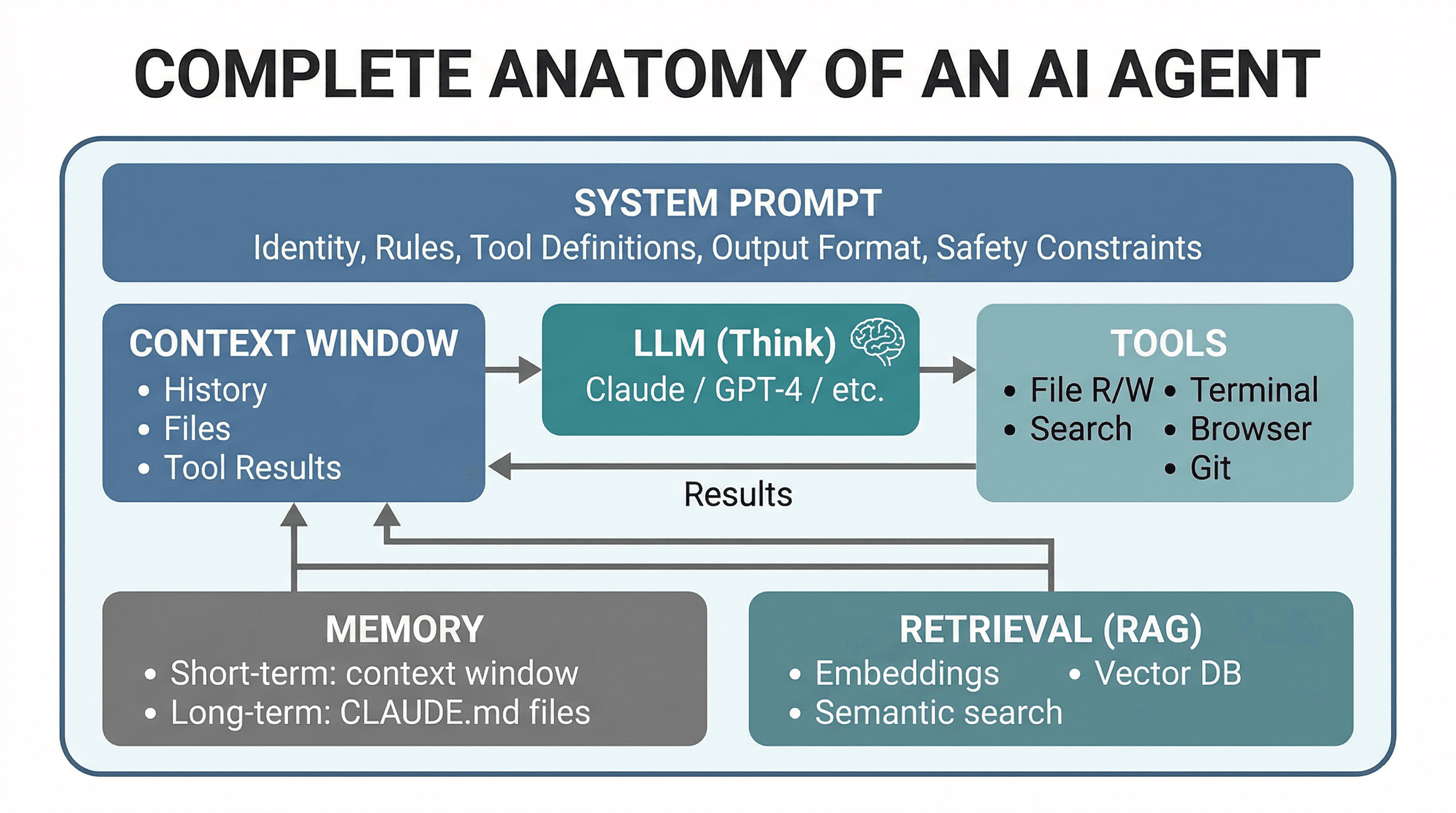
The differences between agents are in the details: how they retrieve context, how many tools they expose, how they plan multi-step tasks, and how they manage memory. But the architecture is always the same loop.
Why This Matters for Developers
You don't need to understand combustion engines to drive a car. But knowing the basics - what the gas pedal, brakes, and gears do - makes you a better driver. Same with AI agents.
Understanding agent anatomy helps you:
- Write better prompts - You know the agent has a system prompt that constrains it. You know the context window is finite. So you write focused, specific prompts that include what matters and leave out what doesn't.
- Debug agent failures - When the agent generates wrong code, you can reason about why. Did it not have the right files in context? Did the retrieval miss a dependency? Is the context window full, causing it to forget earlier instructions?
- Recognize hallucinations - Knowing the LLM is predicting tokens (not looking up facts) tells you when to double-check: API signatures, package names, configuration values.
- Choose the right tool - Need quick autocomplete? A lightweight tool with fast inference. Need a complex refactor across 20 files? An agentic tool with planning and verification. The architecture tells you what each tool is good at.
- Set up your project right - Writing a
CLAUDE.mdor.cursorrulesfile is literally configuring the agent's long-term memory. Now you know why it matters and what to put in it.
Vibe coding is powerful. But vibe coding with understanding is a superpower. You're not just a user pressing buttons - you're a developer who knows what's happening under the hood, and that makes all the difference when things go sideways.
Companion Post
This post explains the car. Want to understand the engine? Read How LLMs Actually Work: A Developer's Guide.
Learn the Lingo
Every technical term in this post is defined in the Vibe Coding Dictionary. Bookmark it.
