The Stack I'd Use to Build Any AI App in 2026
Why Your Stack Matters More Than Ever
Building an AI-powered app in 2026 is not the same as building a CRUD app in 2020. You need a stack that lets you iterate fast, handle structured data for AI workflows, manage auth and storage without headaches, and integrate AI models without fighting your own infrastructure.
The wrong stack will slow you down in ways you don't expect. You'll spend days wiring up authentication instead of building your AI features. You'll wrestle with database schemas that don't support vector search. You'll deploy to a platform that makes streaming responses painful.
After building multiple AI-powered products, I've landed on a stack that handles all of this cleanly. Here's what it is and why each piece earns its place.
The Stack
Let me cut straight to it. This is the stack I reach for every time I start a new AI project:
- Next.js (App Router) - fullstack React framework
- Supabase - Postgres database, auth, realtime, storage, edge functions
- Claude API / Claude Code - AI that powers your app AND accelerates your development
- Tailwind CSS + shadcn/ui - fast, consistent UI development
- Vercel - deployment, edge functions, analytics
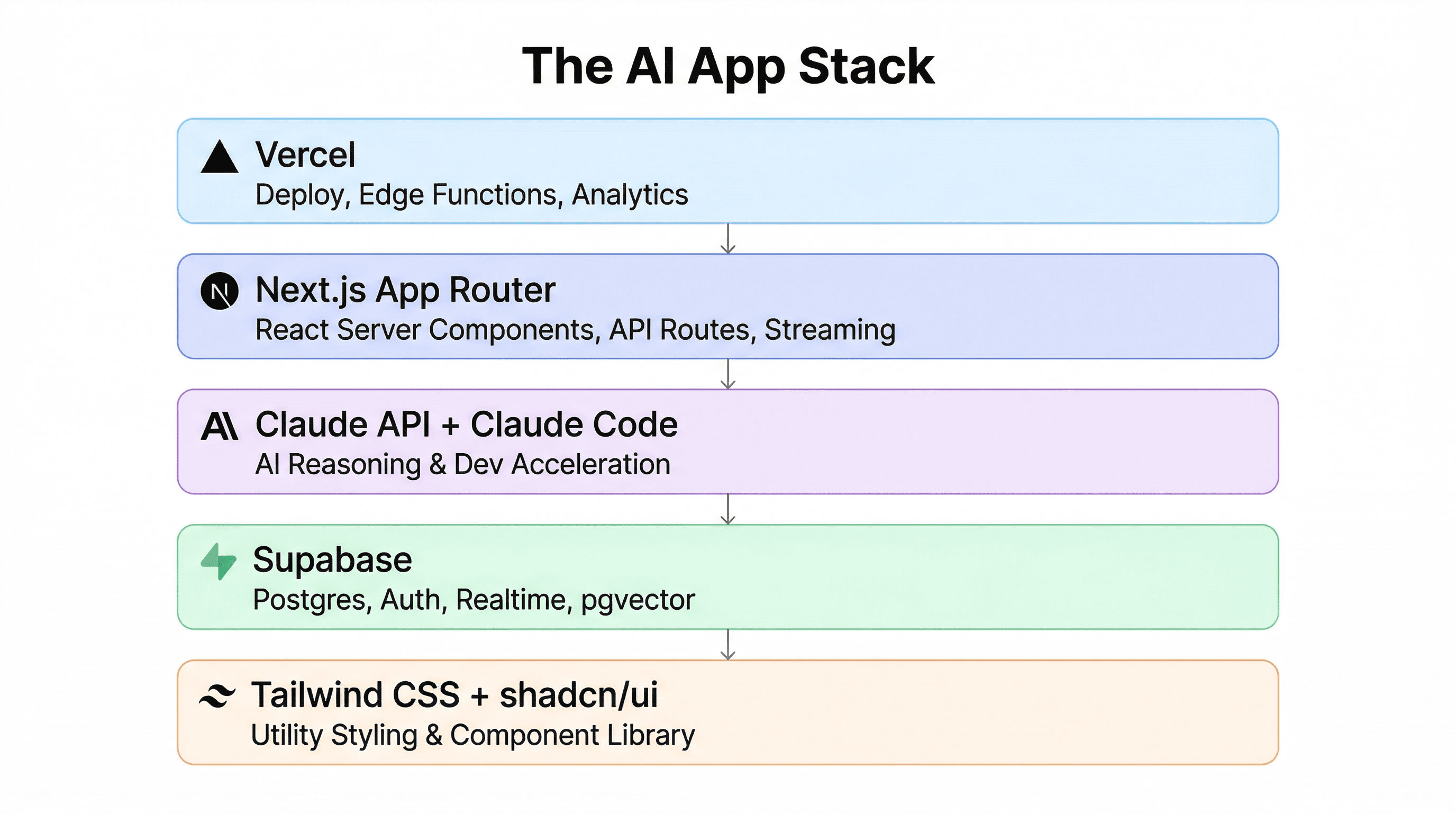
Each piece complements the others. There's no friction between layers, and the developer experience is excellent across the board. Let me break down why.
Next.js (App Router): Your Fullstack Foundation
Next.js with the App Router gives you everything in one framework: React Server Components for fast page loads, API routes for your backend logic, streaming support for AI responses, and first-class Vercel deployment.
For AI apps specifically, Server Components are a game-changer. You can fetch data, call your database, and even make AI API calls directly in your component - no separate API layer needed for read-heavy pages. When you do need an API (for streaming AI responses, for example), Route Handlers are right there in the same codebase.
The App Router's layout system also makes it easy to build complex UIs like chat interfaces, dashboards, and multi-step AI workflows without wrestling with routing.
Supabase: The Backend You Don't Have to Build
Supabase is an open-source Firebase alternative built on Postgres. That distinction matters a lot for AI apps. Here's what you get out of the box:
- Postgres database - real SQL, real relations, real power
- Authentication - email, OAuth, magic links, all pre-built
- Realtime subscriptions - great for live AI status updates
- Storage - file uploads for documents your AI needs to process
- Edge Functions - serverless Deno functions for custom logic
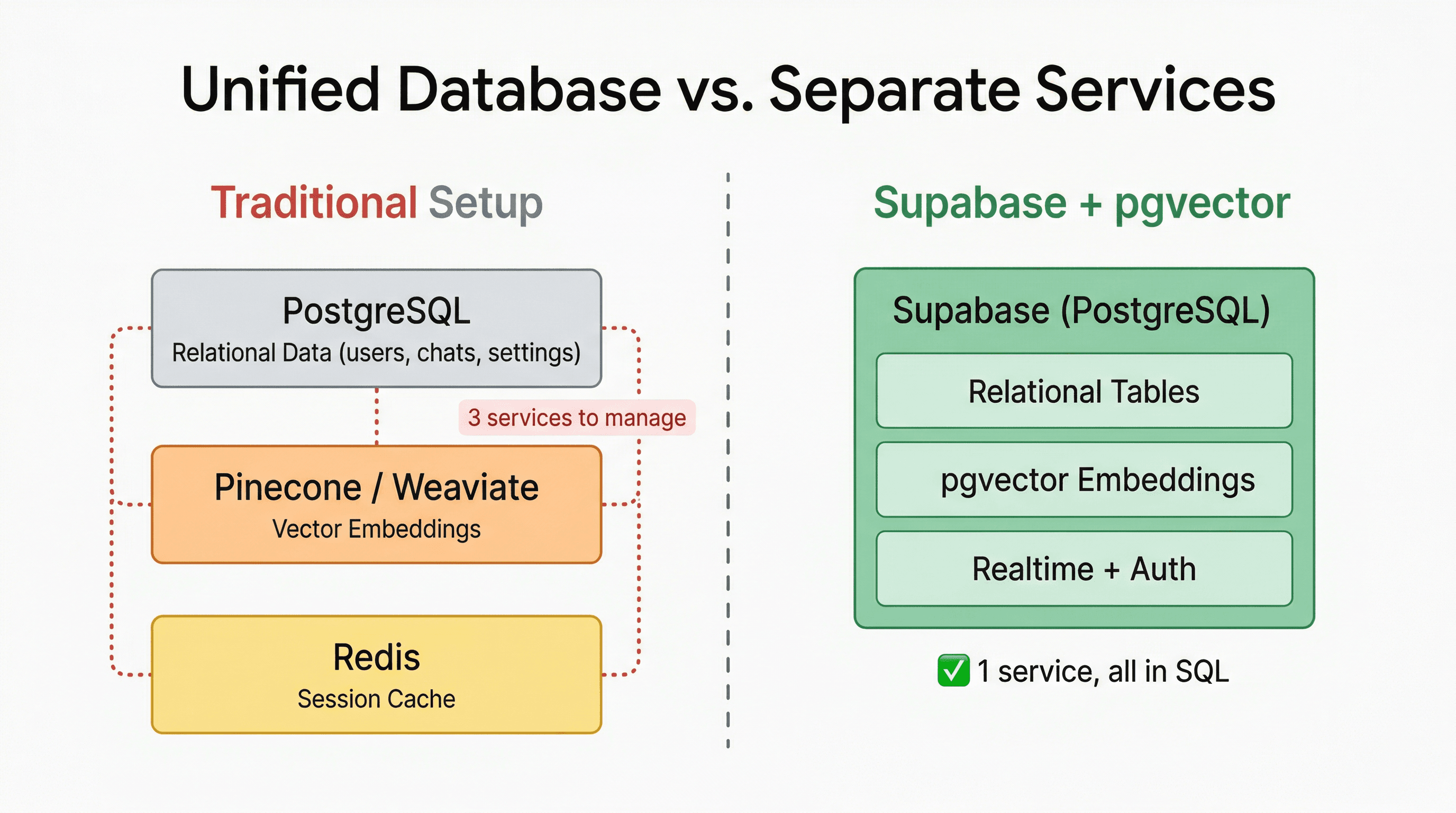
The Postgres foundation is what makes Supabase special for AI. With the pgvector extension, you get vector search directly in your database - no separate vector database needed. Store your embeddings right next to your relational data.
Setting up the Supabase client in Next.js takes about 30 seconds:
// libs/supabase.ts
import { createClient } from "@supabase/supabase-js";

const supabaseUrl = process.env.NEXT_PUBLIC_SUPABASE_URL!;
const supabaseAnonKey = process.env.NEXT_PUBLIC_SUPABASE_ANON_KEY!;

export const supabase = createClient(supabaseUrl, supabaseAnonKey);
And enabling vector search is just a SQL command away:
-- Enable pgvector
create extension if not exists vector;

-- Create a table with an embedding column
create table documents (
  id bigserial primary key,
  content text,
  embedding vector(1536)
);

-- Create an index for fast similarity search
create index on documents
  using ivfflat (embedding vector_cosine_ops)
  with (lists = 100);
Compare this to managing a separate Pinecone or Weaviate instance. With Supabase, your vectors live right next to your data, and you can join them with regular SQL. That simplicity compounds over time.
Claude API + Claude Code: AI on Both Sides
This is where it gets interesting. Claude plays two roles in this stack: it's the AI powering your application AND the AI accelerating your development.
Claude API for Your App
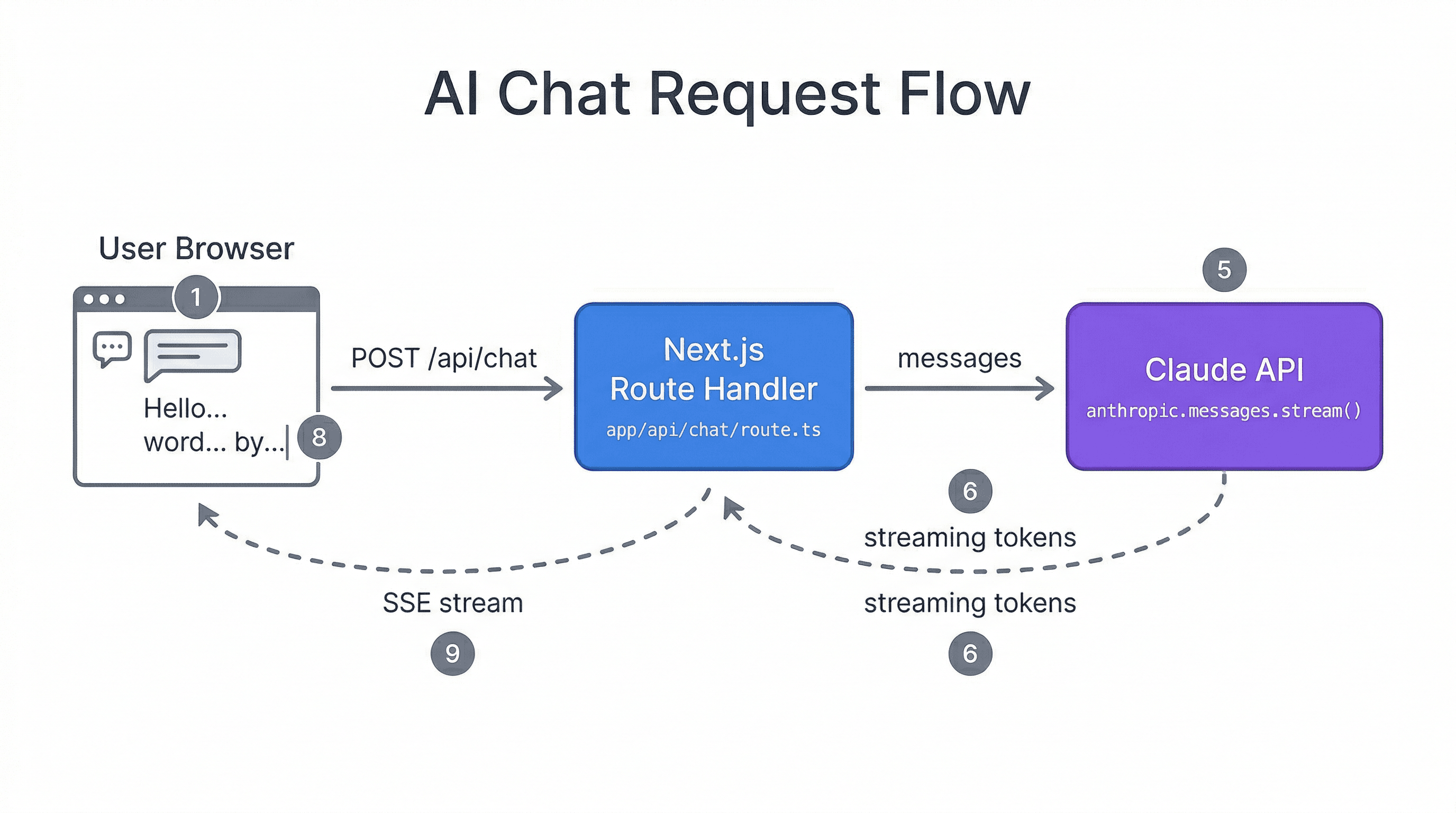
The Anthropic API is straightforward to integrate. Here's a typical Route Handler for streaming AI responses in Next.js:
// app/api/chat/route.ts
import Anthropic from "@anthropic-ai/sdk";

const anthropic = new Anthropic({
  apiKey: process.env.ANTHROPIC_API_KEY!,
});

export async function POST(req: Request) {
  const { messages } = await req.json();

  const stream = anthropic.messages.stream({
    model: "claude-sonnet-4-20250514",
    max_tokens: 1024,
    messages,
  });

  return new Response(stream.toReadableStream(), {
    headers: { "Content-Type": "text/event-stream" },
  });
}
Claude excels at complex reasoning tasks - summarizing documents, analyzing data, generating structured output, and handling nuanced instructions. For most AI app use cases (chatbots, content generation, data analysis, code generation), it's the most capable option available.
Claude Code for Development
Claude Code is Anthropic's CLI tool for AI-assisted development. It understands your entire codebase, can make multi-file changes, run tests, and iterate on your code directly from the terminal.
This matters because the stack I'm recommending - Next.js, Supabase, Tailwind, Vercel - is extremely well-documented and widely used. Claude Code understands these tools deeply. When you ask it to add a Supabase auth flow or create a new API route, it gets it right because it has seen thousands of examples.
The practical impact: you build faster. Features that would take an afternoon take an hour. Boilerplate that you'd normally copy from a previous project gets generated correctly on the first try.
Tailwind CSS + shadcn/ui: UI Without the Bottleneck
UI work is often the bottleneck in AI app development. You want to spend your time on the AI logic, not on pixel-pushing. Tailwind CSS gives you utility-first styling that's fast to write and easy to modify. shadcn/ui gives you beautifully designed, accessible components that you own (they're copied into your codebase, not imported from a package).
Together, they mean you can go from idea to polished UI in minutes, not hours. And because both are widely adopted, Claude Code generates excellent Tailwind and shadcn/ui code out of the box.
Vercel: Deploy and Forget
Vercel is the company behind Next.js, so the integration is seamless. Push to Git, and your app is live. But beyond basic deployment, you get:
- Edge Functions - run code close to your users for low-latency AI responses
- Streaming support - critical for AI chat interfaces
- Analytics - understand how users interact with your AI features
- Preview deployments - every PR gets its own URL for testing
The zero-config deployment means one less thing to think about. And when your AI app starts getting traffic, Vercel scales automatically.
Why This Specific Combination Wins
It's not just that each tool is good individually - it's how they work together:
- Next.js + Supabase = full backend without managing servers. Auth, database, storage, and API routes are all handled. You write application logic, not infrastructure code.
- Supabase's Postgres + pgvector = structured data AND vector search in one place. NoSQL databases like Firestore struggle with the kind of complex queries AI apps need. Postgres doesn't.
- Claude API = the most capable model for complex reasoning. When your AI needs to understand context, follow multi-step instructions, or generate structured output, Claude consistently delivers.
- Claude Code + well-documented stack = faster development. The better-documented your tools are, the better AI-assisted coding works. This stack is about as well-documented as it gets.
When to Use Something Else
This stack isn't the right choice for every situation. Here are some alternatives and when they make sense:
- Firebase + Flutter - if you're building a mobile-first app and want to share code between iOS and Android. Firebase's simpler data model is fine for less complex AI integrations.
- Python / FastAPI - if your app is ML-heavy and you need tight integration with PyTorch, TensorFlow, or Hugging Face. Python's ML ecosystem is unmatched. You can still use Next.js as the frontend.
- Rails - if you're a Ruby developer and speed of development is your top priority. Rails has solid AI integrations now and the convention-over-configuration approach is still productive.
- Django + HTMX - if you want a Python backend without the complexity of a separate frontend framework. Good for internal tools and admin panels with AI features.
Getting Started
Here's how to go from zero to a working AI app with this stack:
1. Scaffold Your Project
npx create-next-app@latest my-ai-app --typescript --tailwind --app
cd my-ai-app
npx shadcn@latest init
2. Set Up Supabase
Create a project at supabase.com, grab your URL and anon key, and add them to .env.local:
NEXT_PUBLIC_SUPABASE_URL=your-project-url
NEXT_PUBLIC_SUPABASE_ANON_KEY=your-anon-key
3. Add the Claude API
npm install @anthropic-ai/sdkAdd your API key to .env.local:
ANTHROPIC_API_KEY=your-api-key4. Deploy to Vercel
npm install -g vercel
vercel
That's it. You now have a fullstack AI app with a Postgres database, authentication, and Claude integration, deployed to the edge. The whole setup takes about 15 minutes.
Why This Stack Works With AI-Assisted Development
There's a reason this stack works so well with AI-assisted development. Every tool in this stack has extensive documentation, widespread adoption, and thousands of open-source examples.
That matters because AI coding assistants like Claude Code are only as good as their training data. When you use well-documented, popular tools, the AI generates better code. It knows the patterns. It knows the gotchas. It knows the best practices.
I've found that working with this stack and Claude Code, I can build features at roughly 3-4x the speed I could two years ago. Not because the tools do the thinking for me, but because the boring parts - boilerplate, configuration, standard patterns - get handled instantly, leaving me to focus on the parts that actually require thought.
That's the real unlock. The best stack for AI apps in 2026 isn't just about what's technically superior. It's about what lets you move fast, stay focused on your product, and ship without fighting your tools. This stack does that.
More blog posts
