Your Cursor-Built SaaS Is Missing These 10 Things Before Launch
You vibe-coded your SaaS in a weekend. It looks great, features work, you're pumped to launch. But if you actually push it to production right now, here's what'll bite you within the first week.
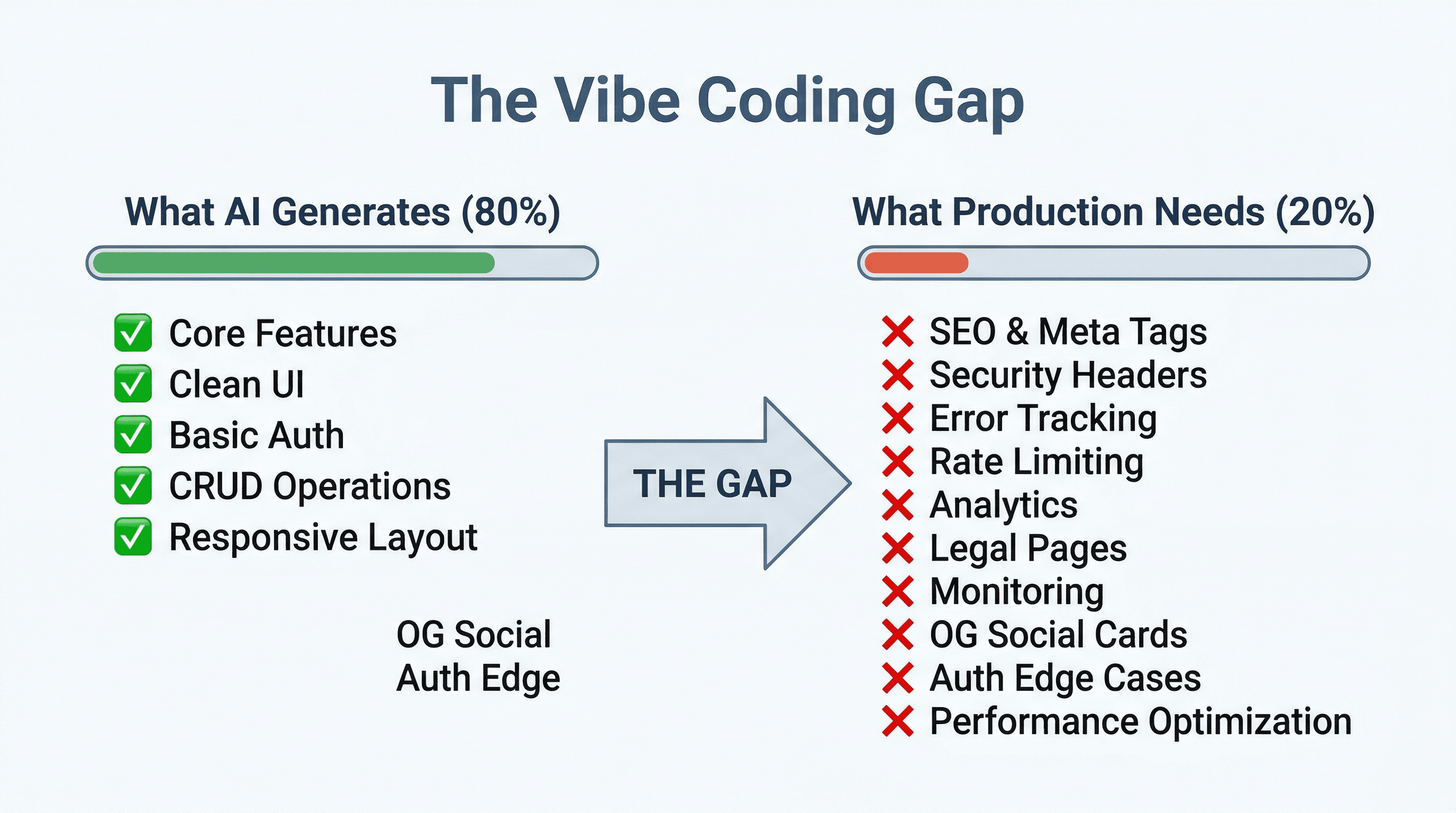
I've reviewed dozens of AI-generated codebases - apps built with Cursor, Copilot, Claude Code, v0, you name it. The pattern is always the same: the core features work, the UI looks clean, and the developer thinks they're 95% done. They're actually about 80% done. That last 20% is what separates a demo from a product people actually pay for.
Here are the 10 things I see missing every single time, and how to fix each one before you launch.
1. SEO Is Completely Missing
What AI typically generates
A beautifully functional app with zero discoverability. No meta tags beyond a basic <title>. No sitemap. No robots.txt. No structured data. No canonical URLs. The AI built you an app that works perfectly - and that Google will never find.
What production actually needs
Every page needs unique <title> and <meta name="description"> tags. You need a sitemap.xml that updates automatically when you add pages. You need a robots.txt that tells crawlers what to index. You need JSON-LD structured data so search engines understand your content. And you need canonical URLs to avoid duplicate content penalties.
Quick fix
In Next.js App Router, use the generateMetadata function or export a metadata object in each layout. Create app/sitemap.ts and app/robots.ts - Next.js generates these automatically. For structured data, add a JSON-LD script tag to your pages (like the one at the top of this very article).
Want to see how bad the damage is? Run your site through a Site Audit to get a full picture. I also wrote a deep dive on SEO fundamentals for developers if you want the full breakdown.
2. Social Sharing Looks Broken
What AI typically generates
No Open Graph tags. No Twitter Card meta tags. When someone shares your app on WhatsApp, Slack, Twitter, or LinkedIn, they get either a blank preview, a generic favicon, or - worst case - the wrong title and description pulled from some random text on your page.
What production actually needs
At minimum, every shareable page needs og:title, og:description, og:image, and og:url. For Twitter, you'll want twitter:card, twitter:title, and twitter:image. The OG image should be 1200x630px - this is what shows up in link previews everywhere.
Quick fix
Add openGraph and twitter properties to your Next.js metadata exports. Create a default OG image at public/og-image.png (1200x630). Use Next.js's built-in ImageResponse API if you want dynamic OG images per page.
Before you launch, test every important page with the Link Preview Checker to see exactly what your links look like when shared.
3. Error Handling Is "console.log"
What AI typically generates
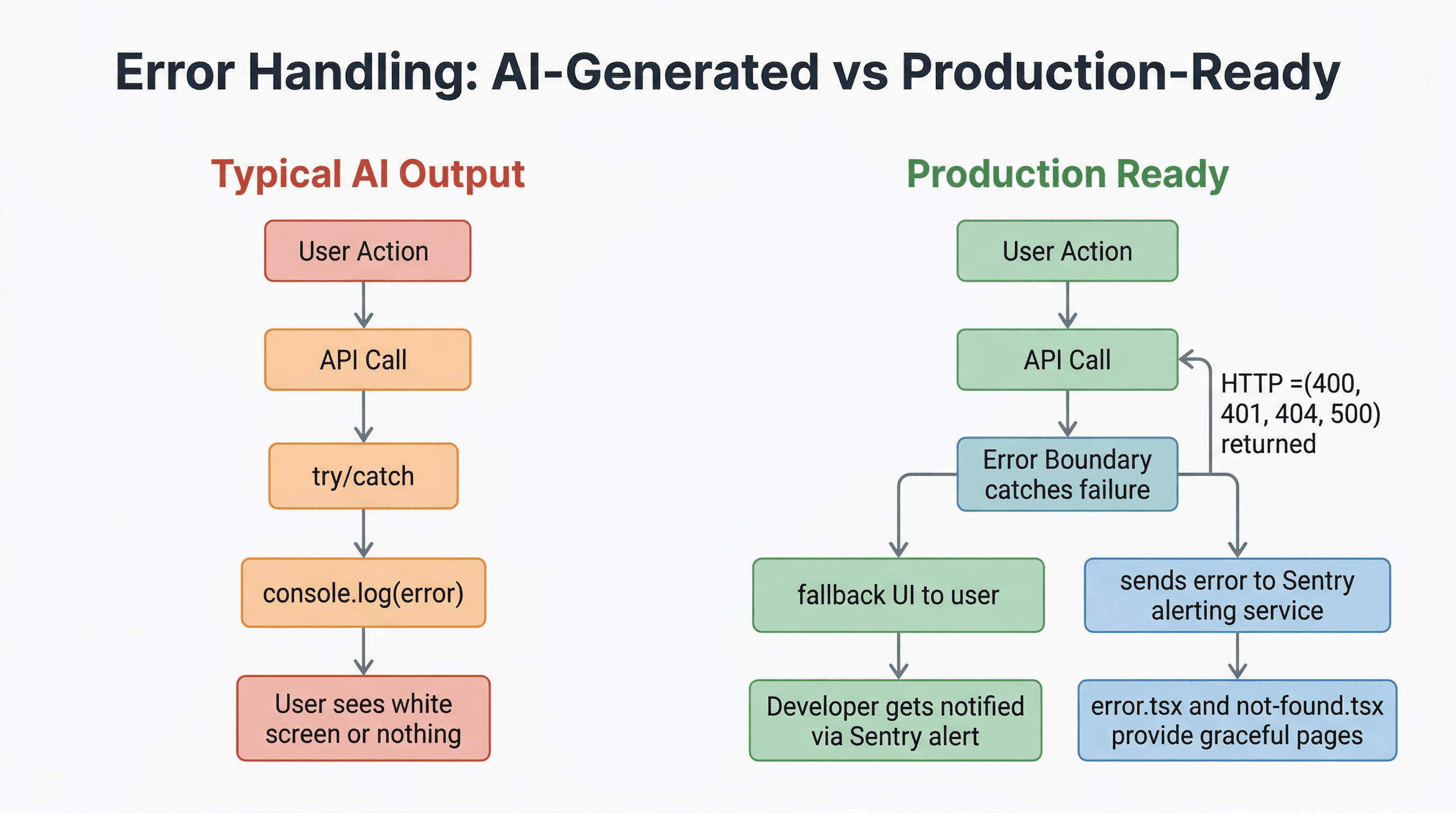
try/catch blocks that log to the console and swallow errors silently. No error boundaries. No global error handler. No fallback UI when something breaks. The AI treats errors as an afterthought because, in the prompt, you probably didn't mention them.
What production actually needs
React Error Boundaries that catch rendering failures and show a graceful fallback instead of a white screen. A global error.tsx and not-found.tsx in your app directory. An error tracking service like Sentry that alerts you when something breaks before your users have to tell you. And actual error handling in your API routes - not just logging, but returning proper HTTP status codes and user-friendly error messages.
Quick fix
Create app/error.tsx and app/not-found.tsx with proper fallback UIs. Install Sentry with npx @sentry/wizard@latest -i nextjs - it takes about 5 minutes and covers both client and server errors. Then go through your API routes and replace every console.log(error) with actual error responses.
4. Auth Has Edge Cases That Will Embarrass You
What AI typically generates
Basic sign-up and login. Maybe email/password, maybe OAuth with Google. It works in the happy path: user signs up, logs in, sees their dashboard. But the unhappy paths? Those are where the bugs live.
What production actually needs
Session expiry handling - what happens when a user's token expires mid-session? Do they get a cryptic 401, or a clean redirect to login? Password reset flow that actually works and doesn't expose timing information. Email verification so people can't sign up with fake addresses. Rate limiting on login attempts to prevent brute force attacks. CSRF protection on all state-changing requests. And proper middleware that protects routes consistently, not just on the pages you remembered to add auth checks to.
Quick fix
If you're using Supabase Auth or NextAuth, most of this is handled - but you need to configure it. Add middleware that refreshes sessions automatically. Implement a proper middleware.ts that protects all /dashboard routes. Test every auth flow manually: sign up, verify email, log in, log out, reset password, expired session, invalid token. If any of those flows feel broken, your users will find out for you.
5. No Rate Limiting Anywhere
What AI typically generates
API routes that happily serve unlimited requests to anyone. No throttling, no abuse protection, no cost controls. Your /api/generate endpoint that calls an LLM? Wide open. Your /api/auth/login endpoint? No brute force protection. Your public form submission endpoint? Bot paradise.
What production actually needs
Rate limiting on every public API route, especially ones that cost you money (LLM calls, email sends, SMS). Different limits for authenticated vs. unauthenticated users. IP-based limiting for login attempts. And ideally, per-user rate limiting for subscription tiers.
Quick fix
For a quick in-memory rate limiter in Next.js API routes, use a simple Map-based approach:
// Simple in-memory rate limiter
const rateLimitMap = new Map<string, { count: number; lastReset: number }>();

function rateLimit(ip: string, limit = 10, windowMs = 60000): boolean {
  const now = Date.now();
  const record = rateLimitMap.get(ip);

  if (!record || now - record.lastReset > windowMs) {
    rateLimitMap.set(ip, { count: 1, lastReset: now });
    return true;
  }

  if (record.count >= limit) return false;
  record.count++;
  return true;
}
For production, use Upstash Rate Limit with Redis - it works across serverless instances and costs almost nothing.
6. Security Headers Are Missing
What AI typically generates
Default Next.js headers and nothing more. No Content Security Policy. No Strict-Transport-Security. No X-Frame-Options. No X-Content-Type-Options. Your app is potentially vulnerable to clickjacking, XSS injection, MIME-type sniffing, and more.
What production actually needs
A proper set of security headers configured in next.config.js. At minimum: Strict-Transport-Security to enforce HTTPS, X-Frame-Options: DENY to prevent clickjacking, X-Content-Type-Options: nosniff, Referrer-Policy: strict-origin-when-cross-origin, and a Content Security Policy that restricts where scripts and styles can load from.
Quick fix
Add a headers() function to your next.config.js:
// next.config.js
async headers() {
  return [
    {
      source: "/(.*)",
      headers: [
        { key: "X-Frame-Options", value: "DENY" },
        { key: "X-Content-Type-Options", value: "nosniff" },
        { key: "Referrer-Policy", value: "strict-origin-when-cross-origin" },
        { key: "Strict-Transport-Security", value: "max-age=63072000; includeSubDomains" },
      ],
    },
  ];
}
Then scan your deployed site with the Security Headers Scanner to see what you're missing. Most AI-generated apps score an F on their first scan.
7. Performance Isn't Optimized
What AI typically generates
Imports like import _ from "lodash" instead of import debounce from "lodash/debounce". Full icon libraries imported for three icons. Unoptimized images served at their original 4000px width. No lazy loading on below-the-fold content. No caching headers on API responses. The app works fine on your fast MacBook, but it's painfully slow on a mid-range Android phone in Southeast Asia.
What production actually needs
Tree-shakeable imports. Next.js's <Image> component for automatic image optimization. Dynamic imports with next/dynamic for heavy components that aren't needed on initial load. Proper Cache-Control headers on your API responses. And ideally, a Core Web Vitals score that doesn't make Google penalize your search ranking.
Quick fix
Replace all <img> tags with Next.js's <Image>. Check your bundle size with npx @next/bundle-analyzer and look for oversized dependencies. Add loading="lazy" to anything below the fold. Run your site through the Performance Audit tool to get a Lighthouse-style breakdown of what's slowing you down.
8. No Analytics or Tracking
What AI typically generates
Nothing. Zero analytics. You launch your app, maybe post it on Twitter or Hacker News, get a spike of traffic... and have no idea how many people visited, where they came from, which features they used, or where they dropped off. You're making product decisions based on vibes instead of data.
What production actually needs
At minimum, a privacy-friendly analytics tool like Plausible or PostHog so you know basic traffic patterns. If you're running paid ads, you need conversion tracking set up properly - otherwise you're burning money with no feedback loop. PostHog also gives you session recordings and feature flags, which are incredibly useful in early-stage products.
Quick fix
Add Plausible with a single script tag - it's the fastest path to useful data. If you're doing paid acquisition on Facebook or Instagram, read my guide on setting up Meta Pixel + Conversions API in Next.js - getting this right can cut your cost per acquisition significantly.
9. Legal Pages Are Missing
What AI typically generates
No privacy policy. No terms of service. No cookie banner. The AI built your app's features, not your legal compliance. If you collect any user data - even just an email address for a newsletter - you need these pages.
What production actually needs
A privacy policy that explains what data you collect, how you use it, and how users can request deletion. Terms of service that protect you legally. If you're targeting users in the EU, you need GDPR-compliant consent flows and a cookie banner. In Israel, the Privacy Protection Authority has similar requirements. If you process payments, your terms need to cover refund policies and billing practices.
Quick fix
Use a generator like TermsFeed or Iubenda for a baseline privacy policy and terms of service. Then customize them for your specific app. Yes, you can ask Claude to draft these for you - just have a lawyer review them before going live. Add links to these pages in your footer. This takes an hour and saves you from potential legal headaches down the road.
10. No Monitoring or Alerts
What AI typically generates
An app that runs until it doesn't, with no way to know when it stops. No uptime monitoring. No health check endpoint. No alerting. The first time your database connection drops at 3am or your Vercel deployment fails silently, you'll find out when a user emails you - or worse, when they just leave.
What production actually needs
An uptime monitoring service that pings your app every few minutes and alerts you immediately when it goes down. A /api/health endpoint that checks your database connection, external API availability, and returns a proper status. Alerts on your error tracking (Sentry) when error rates spike. And ideally, basic infrastructure monitoring - CPU, memory, response times.
Quick fix
Create a simple health check endpoint:
// app/api/health/route.ts
export async function GET() {
  try {
    // Check your DB connection here
    return Response.json({ status: "ok", timestamp: new Date().toISOString() });
  } catch (error) {
    return Response.json({ status: "error" }, { status: 503 });
  }
}
Then set up UptimeRobot (free for up to 50 monitors) or BetterStack to ping that endpoint every 5 minutes. You'll get an email or Slack notification the moment something goes wrong. Total setup time: 10 minutes.
The 80/20 Rule of Vibe Coding
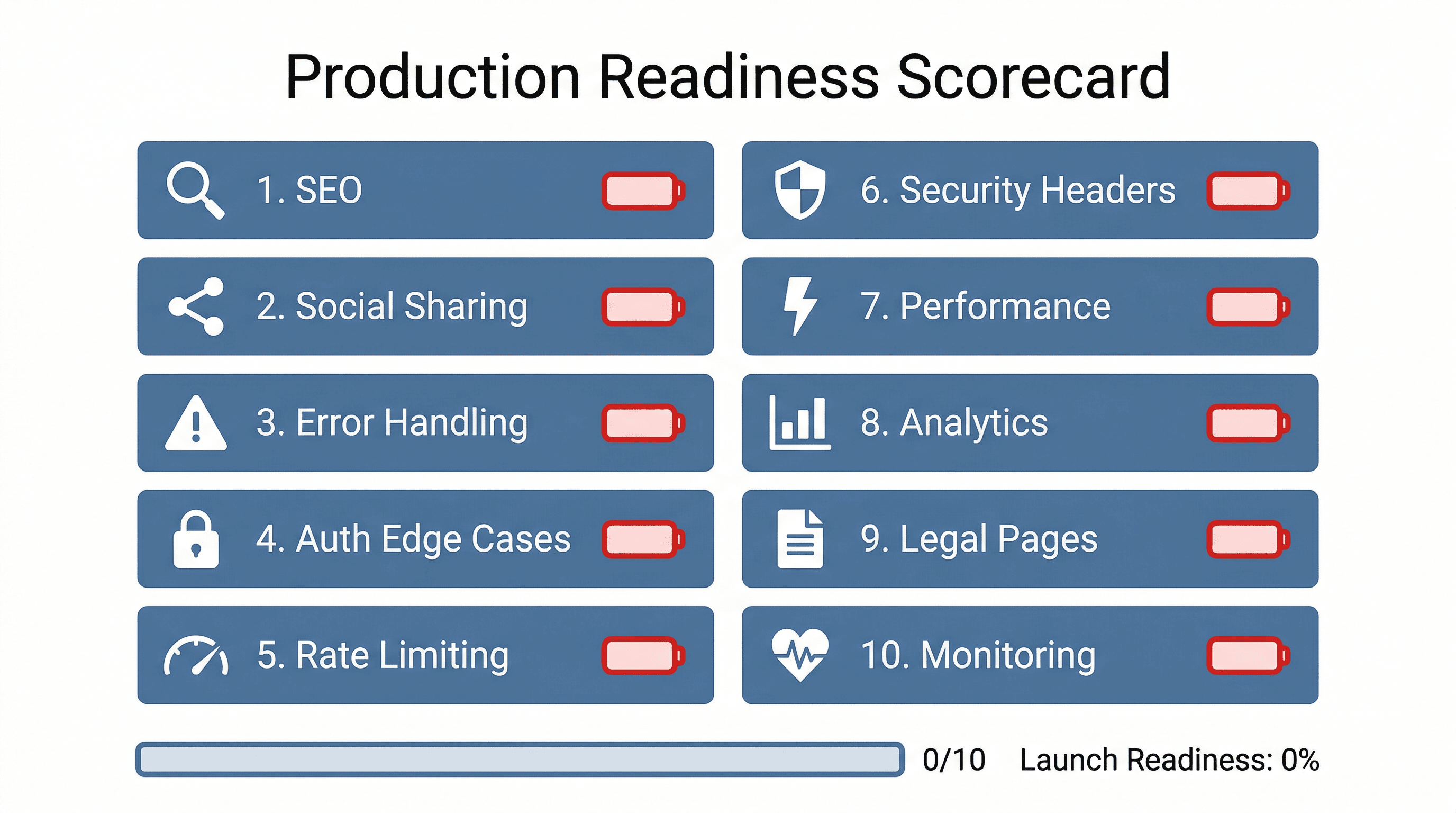
AI gets you 80% of the way there. That's genuinely impressive - what used to take weeks now takes a weekend. But that last 20% is what separates a demo you show your friends from a product people pay for.
The good news: none of these 10 things are hard. Most of them take less than an hour each. The problem is that AI tools don't think about them because they're not in your prompt. You asked for a SaaS with user auth and a dashboard, and that's exactly what you got. You didn't ask for SEO, security headers, error tracking, or legal compliance - so those didn't make it in.
My suggestion: before you launch, go through this list like a checklist. Spend a day or two on the gaps. Your future self - the one dealing with production traffic, real users, and actual money - will thank you.
If you want to automate some of this, I've built a set of free tools that can help:
- Site Audit - scan your site for SEO issues
- Link Preview Checker - see how your links look when shared
- Security Headers Scanner - check your security header configuration
- Performance Audit - get a full performance breakdown
Need help closing the gap on your vibe-coded project? Get in touch - I help developers ship production-ready apps faster.
More blog posts
