Docker Desktop Is Eating Your RAM - I Switched to OrbStack and Never Looked Back
Open Activity Monitor right now. Find com.docker.hyperkit or com.docker.backend. See that 4-8 GB of RAM it's chewing through? That's Docker Desktop sitting there, doing absolutely nothing, while your fans spin and your MacBook pretends it's a space heater.
I lived with this for years. Restarting Docker when my machine got sluggish. Closing Chrome tabs to make room. Bumping my Docker memory allocation down, then wondering why builds crashed. The whole ritual.
Then I tried OrbStack, and within 10 minutes I uninstalled Docker Desktop permanently.
The Problem with Docker Desktop
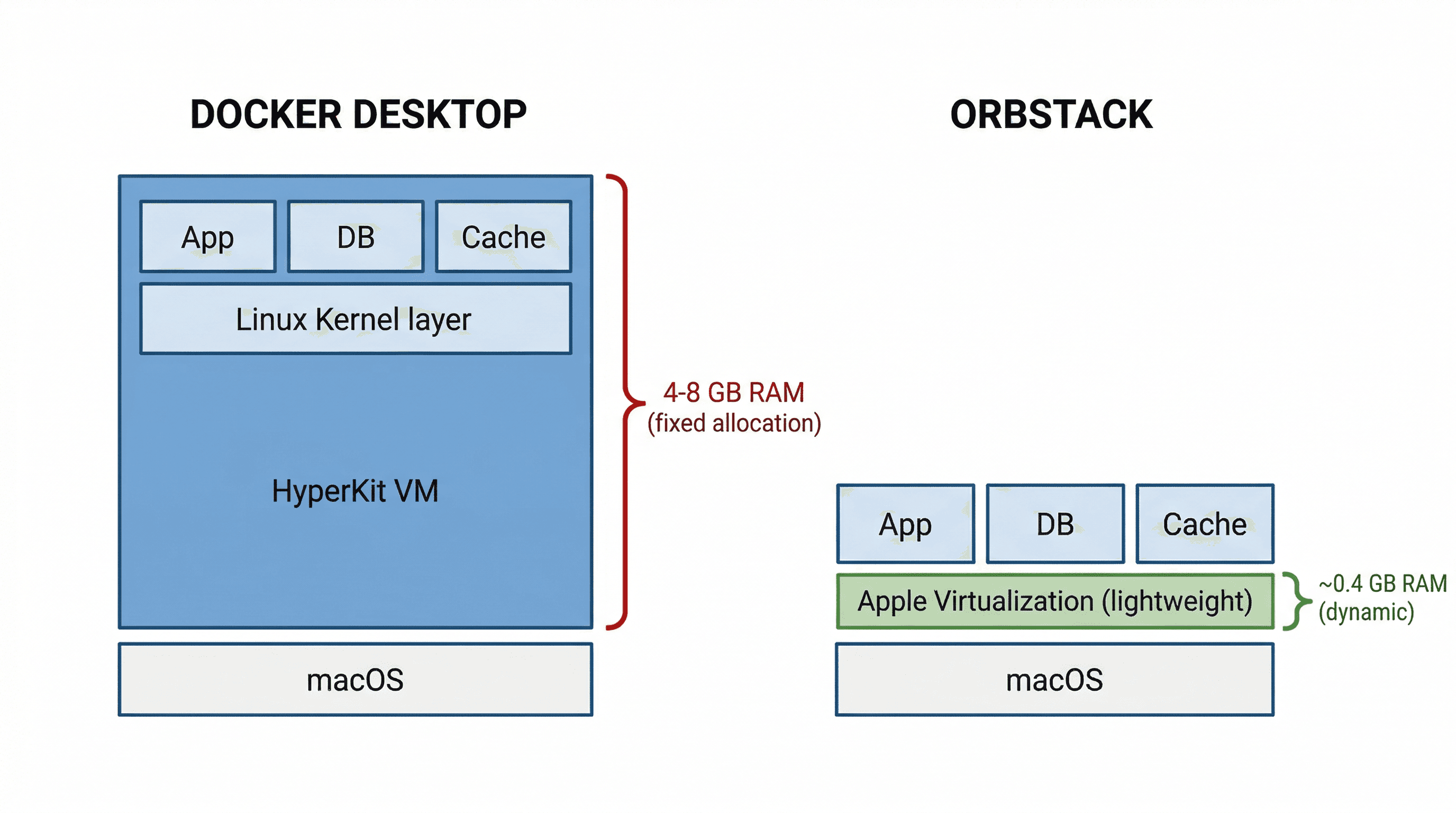
Docker Desktop runs a full Linux virtual machine under the hood. On macOS, it spins up a HyperKit or Apple Virtualization framework VM, allocates a fixed chunk of RAM to it, and keeps it running whether you have containers going or not.
Here's what that actually costs you:
- 4-8 GB RAM reserved by the VM - even with zero containers running
- Slow startup - 30-60 seconds before you can run your first
docker compose up - File system performance - bind mounts between macOS and the Linux VM are notoriously slow, especially for Node.js projects with thousands of files in
node_modules - CPU spikes - the VM's file-watching processes constantly sync changes, burning cycles
- Licensing - Docker Desktop requires a paid subscription for companies with 250+ employees or $10M+ revenue
If you're on a 16 GB MacBook (still extremely common), Docker Desktop alone eats 25-50% of your total memory. That's before you open VS Code, your browser, and Slack.
What Is OrbStack?
OrbStack is a lightweight drop-in replacement for Docker Desktop on macOS. It runs Docker containers and Linux VMs using Apple's native Virtualization framework, but with a completely different resource management approach.
The key difference: OrbStack doesn't pre-allocate a giant block of RAM. It uses dynamic memory - containers get what they need, and the memory is returned to macOS when they're done. No permanent VM sitting there hogging resources.
The Numbers That Made Me Switch
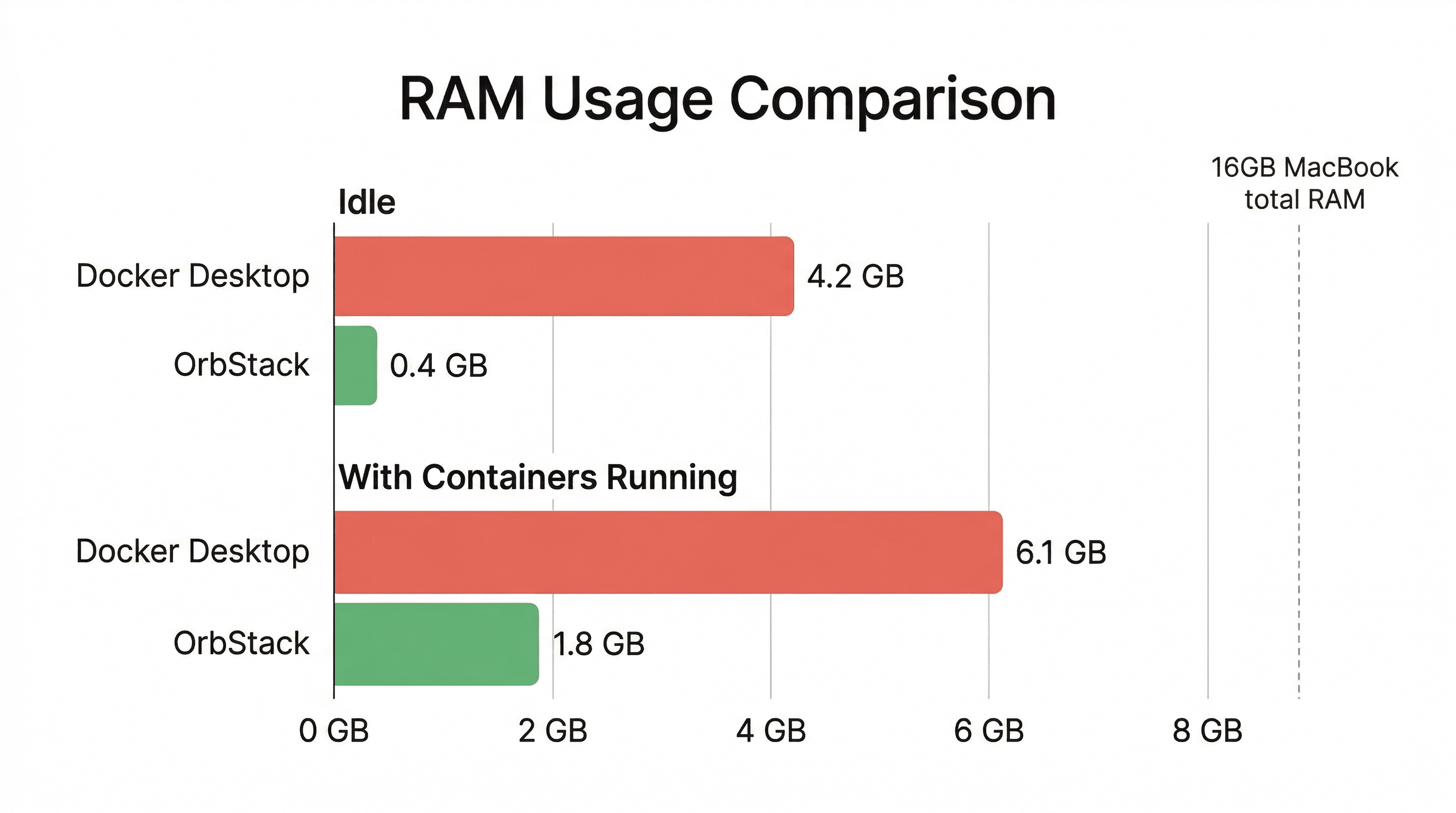
I ran the same stack on both - a Next.js app with PostgreSQL, Redis, and Nginx via Docker Compose. Here's what I saw:
| Metric | Docker Desktop | OrbStack |
|---|---|---|
| Idle RAM usage | ~4.2 GB | ~0.4 GB |
| RAM with containers running | ~6.1 GB | ~1.8 GB |
| Cold start time | ~45 seconds | ~2 seconds |
| File sync (node_modules) | Noticeably slow | Near-native |
| Battery impact | Significant drain | Minimal |
The idle RAM difference alone was enough. Getting back 4 GB of RAM felt like upgrading my hardware.
Switching Takes 5 Minutes
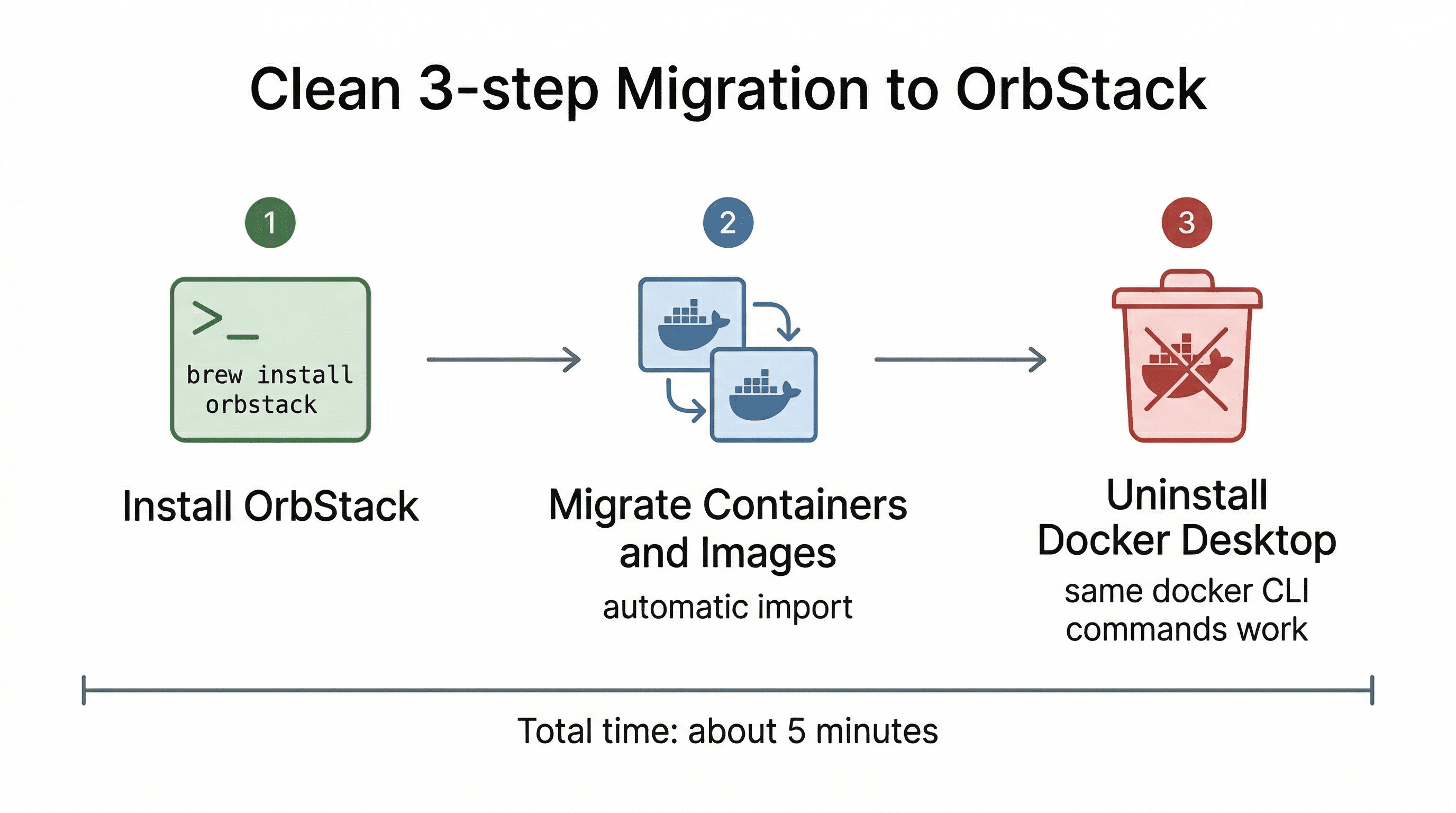
This is the part that surprised me most. OrbStack is a true drop-in replacement - it uses the same Docker CLI, the same Docker Compose files, the same images. You don't change a single line of your docker-compose.yml.
Step 1: Install OrbStack
brew install orbstackOr download it from the website. Open it once and it sets everything up.
Step 2: Migrate Your Containers
OrbStack can import your existing Docker Desktop containers and images automatically. When you first open it, it offers to migrate everything. Click yes and wait a minute.
Step 3: Uninstall Docker Desktop
Once you verify everything works (it will), remove Docker Desktop. Your docker and docker compose commands now go through OrbStack instead. Same commands, same workflow, fraction of the resources.
What About Docker Compose?
Works exactly the same. Your docker-compose.yml files don't need any changes. Every Docker command you know still works:
docker compose up -d
docker ps
docker logs my-container
docker exec -it my-container sh
The only thing that changes is what's running behind the scenes. OrbStack handles the container runtime - you keep using Docker's CLI as usual.
Bonus: Linux VMs in Seconds
OrbStack also lets you spin up lightweight Linux VMs with a single command:
orb create ubuntu my-dev-vmThis creates an Ubuntu VM that starts in under 2 seconds, shares your macOS file system automatically, and uses dynamic memory. It's perfect for testing Linux-specific builds or running tools that don't play well with macOS.
Is There a Catch?
Let's be honest about the tradeoffs:
- macOS only - OrbStack doesn't run on Windows or Linux. If you're on Linux, you're already running Docker natively (no VM overhead). If you're on Windows, look into WSL2 + Docker Engine.
- Personal use is free, commercial is paid - OrbStack is free for personal use. Business use requires a license, but it's cheaper than Docker Desktop's business tier.
- Docker Desktop has Kubernetes built in - if you rely on Docker Desktop's built-in K8s cluster, OrbStack supports Kubernetes too, but it's worth testing your specific setup.
- Docker Scout / Extensions - Docker Desktop has its own ecosystem of extensions and security scanning tools. OrbStack doesn't replicate these. If you depend on them, evaluate whether alternatives exist.
For the vast majority of developers who just need to run containers locally, none of these are dealbreakers.
Why This Matters for AI-Assisted Development
If you're building with Cursor or Claude Code, you're probably running a local database, maybe Redis, maybe a local S3-compatible store like MinIO - all through Docker. These AI tools generate docker-compose.yml files and expect you to run them.
When Docker Desktop is eating half your RAM, your AI coding tools get slower too. Less memory means more swapping, slower indexing, and a worse experience overall. Switching to OrbStack gives your AI tools the headroom they need.
TL;DR
- Docker Desktop uses 4-8 GB RAM idle. OrbStack uses ~400 MB.
- OrbStack starts in 2 seconds instead of 45.
- It's a drop-in replacement - same CLI, same Compose files, zero config changes.
- Install:
brew install orbstack, migrate your containers, uninstall Docker Desktop. - Free for personal use. Your MacBook will thank you.
Building a SaaS with Docker?
Check out The Stack I'd Use to Build Any AI App in 2026 - the full breakdown of Next.js + Supabase + Claude Code + Vercel for shipping fast.
